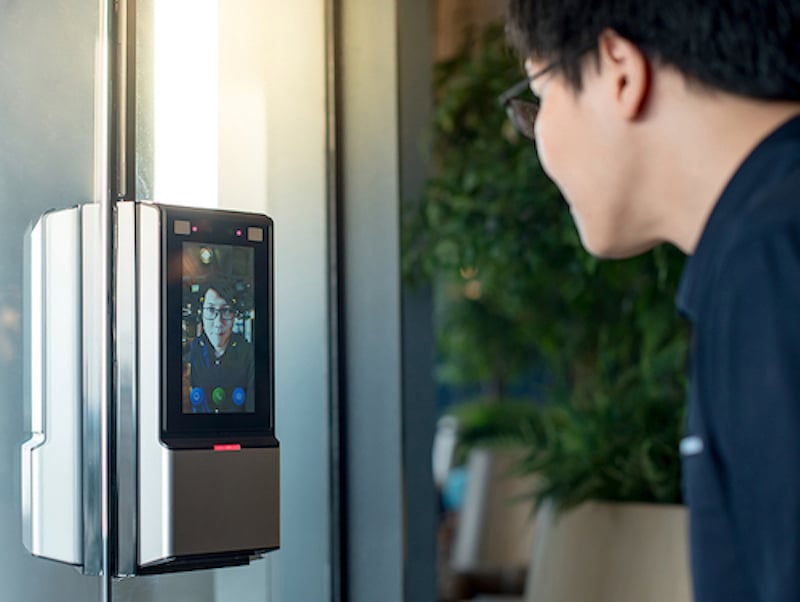
Did you know that employers can save 10% of their payroll expenses and reduce wage theft with a biometric time clock?
4 Ways Biometric Time Clocks Reduce Payroll Costs
- Eliminate time theft by buddy punching
- Reduce time theft by hours padding
- Prevent out-of-schedule punches
- Decrease payroll mistakes
Before we get into the details, let’s go over the basics.
What are ‘Biometrics?’
Biometrics is the collecting and analysis of an individual’s physical or behavioral attributes. The attribute must be unique to that person. When used with biometrics, the attribute or characteristic is called an ‘identifier.’ Identifiers include fingerprints, facial scans, iris scans, hand vein geometry, or DNA. Behavioral identifiers include typing patterns, iris patterns, or gait (the way you walk).
How Does a Biometric System Work?
Any biometric system requires a device, software, and database. The device collects the identifier and then the software converts the collected information into a digital format and stores it.
What are Biometrics Used For?
A biometric system is an effective way to verify a person’s identity. Consequently, they are used in airports, forensic investigations, secure buildings and workforce management. For our purposes today, we will discuss how you use them to track employee work time.
What is a Biometric Time Clock?
Biometric employee time clocks identify employees and track their work hours. Employees punch in and out on the biometric clock. Biometric time clocks can be placed at the entrance to the workplace, or at the entrance to specific departments within the facility. Some employee timekeeping apps have biometric capability. Because of this, it allows employees to clock in from a mobile device. In addition, biometric clocks can sync with employee time and attendance software.
Types of Biometric Time Clocks
Biometric clocks are distinguished by the type of attribute they use. Common identifiers include fingerprints, iris scans, facial recognition, and hand geometry. Some biometric time clocks are designed for specific workspaces. For example, portable dirt- and water-resistant clocks for construction sites.
How Do Biometric Clocks Prevent Employee Time Theft?
Employees steal time in a couple of different ways. Firstly, with paper timecards, it’s easy for an employee to add a few minutes before or after every shift. (‘My manager doesn’t know the exact time I arrived.’) These minutes add up. Consequently, even a small employer can lose up to four hours a week per employee.
Secondly, and perhaps more damaging, employees also commit time theft with ‘buddy clocking’ or ‘buddy punching.’ This is when an employee clocks in for an employee who isn’t at work. In some cases, the employee eventually shows up. Yet there are multiple cases of employees being paid for entire unworked shifts. The scheme prevents the absent employee from receiving a tardy or an absence and ensures their paycheck isn’t reduced.
U.S. employers lose over $370 million a year to buddy clocking fraud. Flagrant abusers can cost their employers thousands of dollars every year.
A biometric time clock can cut your payroll costs by 10% (or more) by preventing time theft.
How Do Biometric Clocks Improve Payroll Accuracy?
Now that we’ve talked about payroll problems caused intentionally, let’s talk about unintentional errors. These include math errors on paper timecards, data entry mistakes, and lapses in memory.
To illustrate, let’s consider how many people touch each timecard with a traditional system. Up to three: 1) the employee, 2) the manager, and 3) an HR or payroll staff member. Clearly, each manual step is vulnerable to human error.
Furthermore, when a timecard error isn’t caught and corrected, it triggers an inaccurate paycheck. When the employee tells the manager or HR team about the error, they have to issue another check. In addition, they may need to fix inaccurate PTO calculations. That isn’t all, the error could affect overtime benefits.
Also, if a tipped employee doesn’t get paid accurately, it may put you in sketchy minimum wage territory. Certainly, in all cases, it’s a hassle for the employee, manager, and admin team.
How Do Biometric Time Clocks Improve Efficiency?
Imagine a large warehouse with hundreds of employees. With an old-school punch clock, each worker has to find their card and put it into the machine. Then they return their card to the rack. This may only take a few seconds, however, multiply that by 50 employees and dozens of weekly shifts. Consequently, it results in lost productivity every month. It’s also frustrating for employees who have to wait in a line.
In contrast, many biometric time clocks don’t require the employee to touch the clock. For example, with a facial scanning clock, the employee stands in front of the clock for a half-second scan. Certainly, it speeds up the line at the time clock. In addition, hands-free clocks simplify punch-in if you’re wearing gloves. Or carrying equipment in factories or industrial environments. And they help maintain sterility in laboratories, hospitals, and ‘clean-room’ manufacturing spaces.
How Does a Biometric Time Clock Improve Security?
Business owners that need secure access can use a biometric clock. They can put one at each entry point in the building. Or they can place them at the entrances to areas within. For example, those with sensitive documents or equipment. A biometric clock only allows access by authorized employees.
How Does a Biometric Time Clock Sync With Timekeeping Software?
Now that we’ve discussed the hardware, let’s turn our attention to time and attendance software. Timekeeping software syncs with time clocks–both biometric and non-biometric clocks.
These include proximity card clocks, PIN clocks, or web portals. When you sync timekeeping software with a biometric clock, you gain more control. You also automate many time-consuming workforce processes.
This is how it works:
- Employee clocks in with the biometric clock.
- The clock identifies the employee and records the punch time.
- Integrated timekeeping software adds the hours worked to the employee’s (virtual) timecard.
- At the end of the payroll period, the software imports the hours data into the payroll system.
Of course, tallying hours is essential, but the systems do much more. In fact, they give you timekeeping superpowers. Let’s look at some of them:
- Breaks/meals tracking
- PTO accrual tracking
- Missed punch notifications
- Overtime alerts
- Intelligent prompts
- Customizable compliance settings
How Does a Timekeeping System Reduce Missed Punches?
‘Intelligent prompts’ means the clock interface will present only logical options to each employee. For example, suppose an employee is already clocked out for a break. When he returns from the break, the clock prompt will only present the END BREAK punch option.
How Does a Timekeeping System Enforce Schedules?
If you configure ‘schedule enforcement,’ an employee who attempts to clock in before the scheduled shift start time, the clock will deny access. Then, a prompt will notify her of her authorized start time. Therefore, she can’t clock in until that time.
How Does a Timekeeping System Prevent Buddy Punching?
Certainly, buddy punching can wreak havoc on your labor budget. Because biometric clocks require a biological identifier, there is no way to cheat the system. (I can imagine a few, but they would only occur in a horror movie.)
Are Biometric Time Clocks Regulated?
Yes. Some states limit what types of biometric data you can collect. They also dictate how you can store and use the information. In addition, there are federal privacy laws that come into play. Therefore, if you are considering a biometric time clock, find out what your legal obligations are.
Retail business owners have to juggle many balls to stay profitable. These include managing inventory, competing with the e-commerce giants, handling both online and offline sales, and complying with yet another regulation. All the while, they have to satisfy customers who know as much about their products as the manufacturer. Clearly, it’s a wonder that any small retail businesses survive at all.
How Biometric Clocks Increase Profitability for Retail
When it comes to retail employee fraud, inventory shrinkage gets the most attention. For many retail businesses, however, time theft is even more widespread and costly.
Accidentally on Purpose?
Did you know that wage theft is so common that business consultants routinely recommend that employers take it into account when planning labor budgets?
According to an anonymous study conducted by Kessler International: of 500 employees working in the retail and service industries, over 30% admitted to misrepresenting work time.
Moreover, it’s not hard to imagine that some don’t admit it even in an anonymous survey. Unfortunately, hiring only employees who are honest 100% of the time is impossible in an imperfect world.
To recap, how do employees willfully commit time fraud?
- Clocking in early or clocking out late
- Not clocking out for unpaid breaks and meals
- Buddy punching
Of course, when you are paying workers for time they didn’t actually work, you are unnecessarily inflating what is already your biggest expense—cost of labor. In addition, labor costs can be unnecessarily high due to human error.
Similarly, how are labor costs inflated non-intentionally?
- Inability to accurately recall previous shift times
- Miscalculations when supervisors reconcile timecards
- Human error when HR managers calculate accruals
- Data entry mistakes when manually entering hours
Do the Math and Cry
So what’s the financial damage if a typical percentage of your employees are padding their timecards or buddy punching? Estimates range from two to four hours a week per employee. For our example, let’s assume that you are paying an extra three hours a week per employee. If the average hourly wage in your company is $18, and you have 30 employees, the grand total is $84,240 dollars in overpayment each year!
If you have employees who leave the business on the clock to travel to another location, make deliveries, pick up supplies, or run errands, you are even more vulnerable to time theft.
Here’s Your Company Card—Have Fun!
Unfortunately, many employers don’t realize how much they are losing. Failing to prevent employees from fudging timecards makes about as much sense as leaving your stores unlocked at night or giving each employee a company credit card.
The Problems with Swipe Cards
Now, let’s discuss a common clocking method that was supposed to solve employee time theft. We’re talking about swipe or proximity cards. Unfortunately, they haven’t lived up to the promise. For one thing, they get lost. In addition, they can easily be damaged or get dirty. Just as importantly, they can be lent and borrowed. When an employee complains that the machine won’t take his card, you are back to the shaky ground of self-reporting.
Biometric Time Clocks for Small Businesses
So if swipe cards can’t prevent time theft, what is the answer for identifying your employees in a way that can’t be exploited? Enter biometrics.
Biometric Employee Time Clocks
For these reasons, biometrics are a match made in heaven for tech-savvy retail business owners. But even if technology isn’t your forte, rest assured that biometric time clocks are not difficult to use. They do, however, make it nearly impossible for employees to steal time.
If You Aren’t Using Biometrics, You May be Hemorrhaging Cash
Unfortunately, some small business owners think biometric technology is prohibitively expensive. In the example cited previously, however, a retail business with thirty $18/hour employees loses $84K a year in time theft. Talk about expensive! And just to reiterate, the estimate is for a typical retail business, not an outlier. Your business might have more time theft than the average.
Increase Profits, Not Overhead
As mentioned previously, retail businesses have many challenges, but shrinking profit margins seems to concern most every owner. How can you increase your profits without raising overhead? Adopt biometric time clocks at all of your locations, you can reduce the big chunk of your overhead that is your payroll expense. Therefore, you increase profits without even touching any of your other fixed or variable costs.
How a Biometric Time Clock Can Increase Efficiency
Swipeclock biometric time clocks automatically capture employee punches to the minute. The data syncs with Swipeclock’s timekeeping solutions. Therefore, human error is removed from the equation. And suddenly, your HR team has 20 more hours a week. Certainly, your supervisors will not miss all that timecard detective work!
Biometric Time Clocks Bring Compliance Peace of Mind
Compliance can be a full-time job for the small business owner or HR manager. Large companies have the resources for large compliance departments and legal teams. Regardless, billion-dollar global companies are penalized for wage hour violations every year. For example, Disney was ordered to pay several million in back wages due to an FLSA action.
Retail employers are subject to minimum wage, overtime, family leave, and predictive scheduling. Accurately tracking hours, schedules, PTO, and overtime is priority one when complying with the various labor laws—FLSA, ACA, FMLA—and any local or state-level laws.
For some retail employers who adopted biometrics, the compliance benefits were the greatest motivator. In some cases, even more persuasive than the reduction in labor costs. Accurate employee hours date that can be readily accessed and validated is your protection against a labor violation resulting from either an audit or employee dispute.
In summary, retail employers have much to gain financially from a biometric time and attendance system. However, improvements to workflow, compliance security, employee accountability, and a reduction in time spent on non-billable activities are just as compelling.
Automate Your Payroll and Save Money
Some of your employees are likely salaried, while other employees may be paid on an hourly or a daily rate.
Biometric clocks streamline the pay for various employees and types of wages.
Automatic timekeeping can track employee hours and ensure that you don’t accidentally break FLSA overtime rules.
It can streamline the pay for employees on different pay scales.
In addition, biometric timekeeping eliminates the need for payroll staff to re-enter employee data into a payroll system.
It keeps your payroll department running smoothly.
Employers Should be Aware of State Laws Around a Biometric Time Clock
As shown, biometric use has a lot of benefits.
However, it is also vital for employers to understand the laws that govern biometric use.
This will help employers to stay compliant and prevent violations that can threaten their budget and reputation.
Currently, there are four states that have biometric laws; Illinois, New York, Texas, and Washington.
Create a Policy Around How Biometric Information is Captured and Stored 
Make sure your employees can read and review how their employer uses biometric data.
It should describe the security measures and outline who can access the information.
This can provide an assurance that the use of their biometric information won’t change in the future.
Test Train and Document
Make sure that everyone is trained on the new system and understands how to use it.
Consider running the new system parallel to the old system for a payroll cycle or two.
This gives everyone a chance to get used to the new system and comfortable with it.
Make sure to write down the steps for the administrative actions.
This helps as you get new employees and will help if administrators of the system are on vacation or leave the company.
In conclusion
We hope this information helps you determine if a biometric time clock is right for your organization. If you would like a demo of Swipeclock biometric time clocks, visit Swipeclock Time Clocks.
Resources
American Payroll Association
Nucleus Research