




This is a common architecture we see throughout State and Local Government customers (figure 1). This scenario also exists in many multi-national organizations, as well as very large organizations with a centralized structure. For the public sector, agencies (or companies) are typically managed centrally by the State, City, or County’s central IT team:
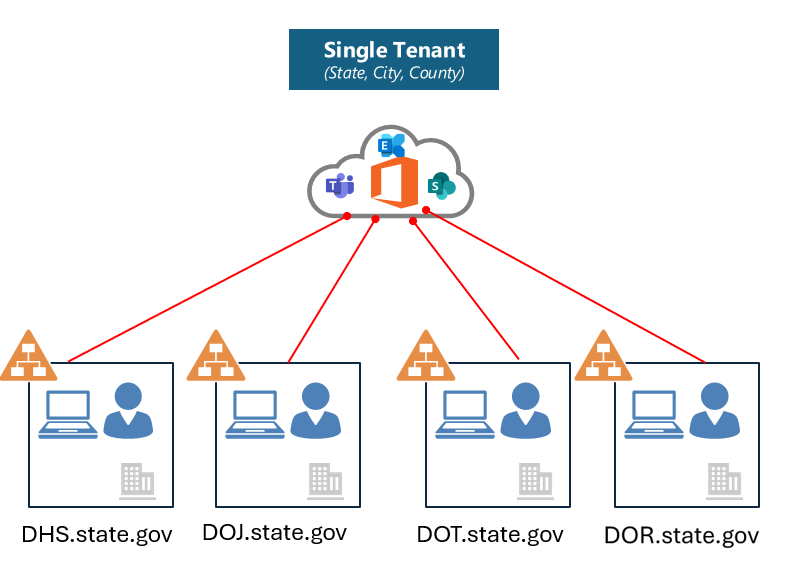
Figure 1
The operations or central IT team manages the tenant on behalf of the hosted agencies. This often presents challenges for both the tenant provider (central IT/Operations) and for the agencies, especially when it comes to data security policies. For example, only central IT typically has access to the Microsoft Purview portal. What this means is that only central IT can:
- Create/manage data loss prevention policies
- Create/manage information protection label policies
- View data loss prevention alerts
- View audit events
Often times this creates a lot of administrative overhead for central IT admins as they have responsibility for not only creating/managing policies, but also triaging alerts related to the agencies in the shared tenant. This can be very cumbersome, especially in centralized organizations that host 40, 50, 60, 70 or more agencies in the tenant.
In addition, many times government agencies have specific regulatory requirements they need to comply with (for example – HIPAA, CJIS, IRS Pub 1075). Without the ability to create and manage data loss prevention and data protection policies, this can hinder their progress in ensuring they are meeting regulatory requirements. Moreover, without access to audit events and alerts, agencies are limited on demonstrating the effectiveness of their data protection / data privacy program.
Administrative Units with RBAC scoping can help! Admin units allow you to subdivide your organization into distinct units and then assign specific admins that can manage only the members of that unit.
Essentially, this helps solve use cases for central IT and agency admins!
Here’s how:
- Central IT Admins can define granular user scopes in the Purview portal role permissions workflow and ring-fence roles to a specific set of users based on agency, department, geo, etc.
- Agency admins with granular user scopes can create and manage policies only for users within their scoped permissions. (without impacting other agencies/companies)
- Agency admins with granular user scopes can access dashboards to manage alerts and view audit events for ONLY their users.
In Figure 2, think about the IT admins from each of these agencies: DOH, DHS, and DOT. With RBAC scoping and Admin Units, these admins can create policies for data loss prevention and information protection for their user groups, without impacting other agency users. In essence, they can ONLY see the policies they create and scope these policies to their users groups.

Figure 2
RBAC scoped permissions can also be uses for different role groups depending on the level of access you want to provide for the administrator. As depicted in Figure 2, you can assign the Information Protection Admin role to the “Data Protection Lead”, the Information Protection Investigator role to the “SOC Lead, and Information Protection Analyst role to a “SOC Analyst”. Each of these have different role-based permissions.
To see which Purview Role groups can be assigned to Admin Units please see:
Permissions in the Microsoft Purview compliance portal | Microsoft Learn
While this blog is primarily focused on the data security solutions in Purview as they relate to Admin Units, below is a list of all the Purview solutions that currently support Admin units:
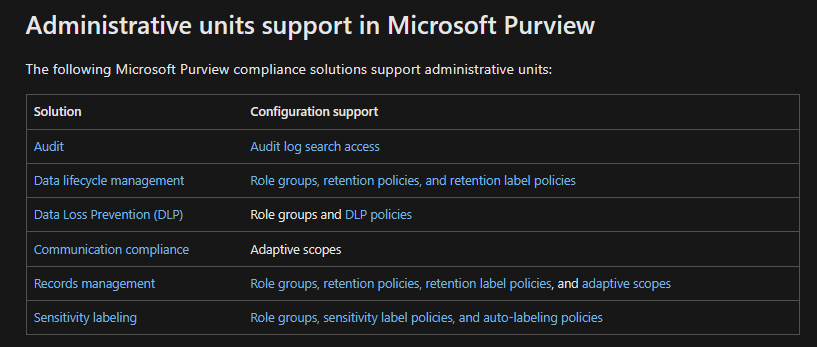
Figure 3
In order to configure administrative units, your organization needs to meet the below licensing prerequisites:
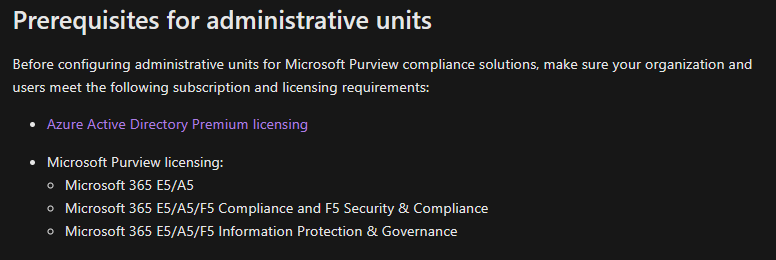
Figure 4
Let’s now see how you can create and use Admin Units based on a common use case in State and Local Government (multiple agencies hosted in a shared tenant managed by central IT):
Use Case
- Contoso has 2 agencies in the tenant – DOH and DOT
- Contoso Compliance Administrators should be able to administer DLP policies entire Contoso tenant.
- DOH Compliance Administrators should be able to administer DLP policies for ONLY users in DOH agency.
- DOT Compliance Administrators should be able to administer DLP policies for ONLY users in DOT agency.
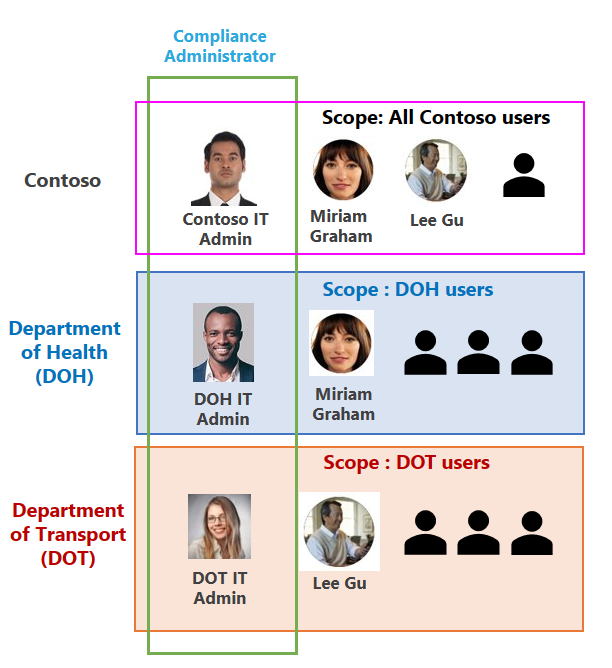
Figure 5
Steps:
Step 1 – Create Administrative Units in Azure Portal for DOH and DOT – To be executed by Central IT:
- Contoso Central IT signs in to the Microsoft Entra admin center as at least a Privileged Role Administrator.
- Browse to Identity > Roles & admins > Admin units.
- Select Add.
- In the Name box, enter the name of the administrative unit “DOH Org”. Optionally, add a description of the administrative unit.
- Click “Review+Create” and create the Admin unit.
- Open the Admin unit that you just created and click on “Properties.”
- Select “Membership Type” as “Dynamic User”.
- Select Add dynamic query.
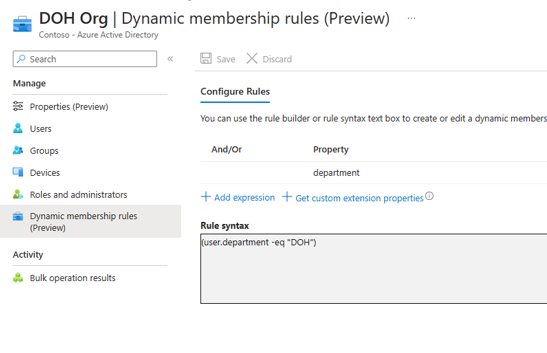
- Use the rule builder to specify the dynamic membership rule as below. Here we have used the department attribute and set it to “DOH”.
Figure 6
- Follow steps 1 to 9 to create an admin unit for DOT.
- We now have 2 admin units that we can start leveraging in the MS Purview portal.
Reference links for creating admin units:
Permissions in the Microsoft Purview compliance portal | Microsoft Learn
Step2: Scope Purview Roles to Admin Units – To be executed by Central IT
- As per requirement in Figure 5, let’s assign Purview Role group Compliance Administrator to DOH IT admin to manage policies for DOH agency and assign Purview Role group Compliance Administrator to DOT IT admin to manage policies for DOT agency.
For this:
- Contoso Central IT navigates to Home – Microsoft Purview-> Roles & scopes-> Permissions. Use global admin or Contoso Compliance Administrator credentials.
- Under “Microsoft Purview solutions”-> Click “Roles”
- Select “Compliance Administrator”.
- Click on “Choose Users” and add both the DOH and DOT admins.
- Select the DOH Admin and then assign the “DOH Org” admin unit.
- Similarly, select the DOT Admin and then assign the “DOT Org” admin unit.
- So, we have now assigned both the departmental admins to their corresponding agency admin units.
-
Figure 7
-

Refer steps here add users or groups to a Microsoft Purview built-in role group.
Step 3: Agency administration for DLP Policies
- DOH Admin to create DLP policy to protect content containing ePHI and Medical Terms for DOH employees. DOH Admin can check Activity Explorer for DLP rule matches of DOH users.
- Login to Home – Microsoft Purview using DOH Admin credentials.
- Go to “Data Loss Prevention” -> Click “Create policy”.
- Choose “Medical and health” category-> Select “U.S. Health Insurance Act (HIPAA) Enhanced” template.
- Give the name to the policy as “DOH DLP Policy”.
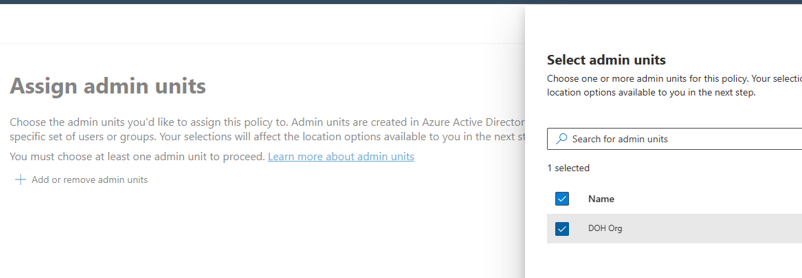
- Then click “Add or Remove admin units”.
- Select the admin units “DOH Org”.
-
Figure 8
-
- Select all Exchange, OneDrive accounts and Teams and click Next.
- Choose all default settings and finish creating your policy.
- If you want to test the DLP action, make sure you selected “Turn it on right away” as the DLP Policy mode.
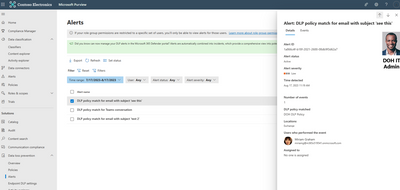
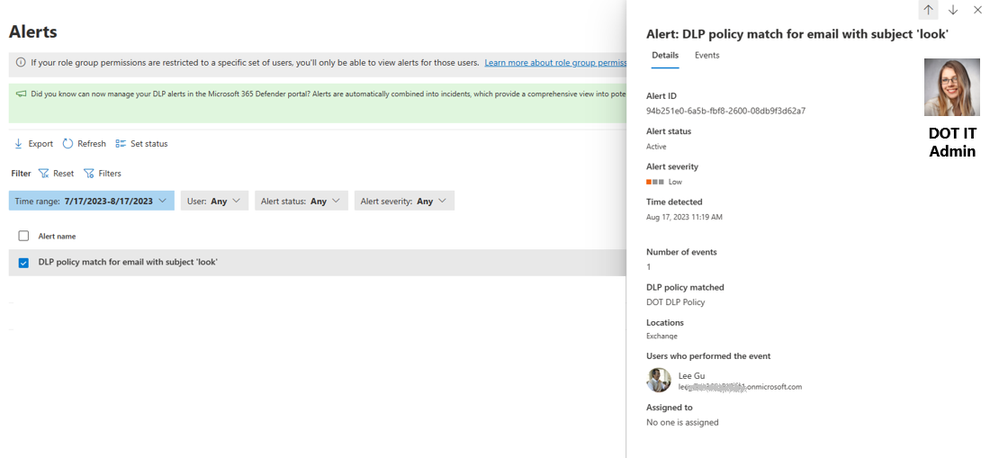
- Now, if any DLP policy match for a user in DOH admin unit, the corresponding alert will be generated “Data Loss Prevention”->Alerts.
- The DOH IT admin will be able to see DLP alerts only for their admin unit. Contoso IT admin will be able to see alerts for all users in the tenant.
-
Figure 9
-
- The DOH IT admin will be able to see the Activity “DLPRulematches” for users in DOH Org within the Ms Purview Activity explorer.
Figure 10
Please refer to the steps below to create and deploy DLP policies.
Create and deploy a data loss prevention policy | Microsoft Learn
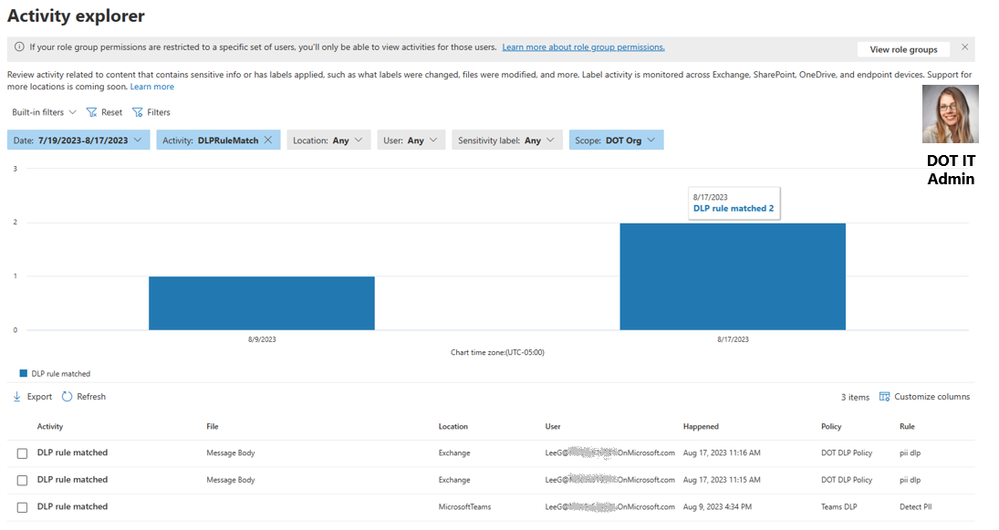
- Similarly, DOT admin can follow steps 1 to 12 above, to create DLP policy to protect content containing PII for DOT employees. DOT Admin can check Activity Explorer for DLP rules matches of DOT users.
Figure 11
Figure 12
Similarly, agencies can also create & manage Information protection and Data lifecycle management policies for their own agencies. They can also check Audit logs, just for their own agencies.
CONCLUSION:
As you can see, administrative units and RBAC user scoping is quite simple to configure and deploy. This is a powerful feature that can be leveraged to solve for the most common use case we see in State and Local Government as it applies to shared tenants. Admin units with RBAC scoping can reduce administrative burden for central IT, while providing agencies with access to deploy policies and manage their alerts and audit events. In addition, central IT does not lose visibility into what agencies are deploying and they retain full control and visibility over all policies and audit events. Central IT can still see ALL policies that have been deployed in the Purview portal and can assist agencies when needed, instead of managing and creating all data security policies and triaging ALL alerts on behalf of the agencies.
For more information on how central IT admins and agency admins can use admin units with RBAC scoping, please see the recording: https://youtu.be/69i4Cy2mdEg?si=ucybUvtAXAG1TbPTW
Are you interested in giving Admin Units/RBAC scoping a try, but do not currently meet the licensing requirements? Well, you can easily request an in-product trial directly from the Purview portal (see figure 5). This trial will give you 90 days to try all G5/E5 Compliance solutions.

Figure 5
NOTE – Admin units with RBAC is currently available for Commercial customers and is scheduled to be available for GCC customers in October 2023 for Data Loss Prevention/Information Protection and Audit:
DLP/MIP – Microsoft 365 Roadmap | Microsoft 365
Audit – Microsoft 365 Roadmap | Microsoft 365
If you like to learn more about SLG use cases for Microsoft Purview, please feel free to Join the Microsoft Purview Customer Community for SLG! (office.com).
When you join this community, you will receive invitations for webinars that cover topics related to Microsoft Purview and answers to the #1 question government customers have - “What are other customers doing?” We cover use cases learned from the field and we share it back with the community. We also invite customer, industry, and Microsoft experts to have discussions covering topics related to data security, privacy, risk, data governance, and compliance.












