




With the recent announcements around Copilot, especially Copilot for Microsoft 365, many agencies are excited to adopt the new capabilities and unlock user productivity and accessibility. However, there is one lingering question that has always and continues to be in the background: “How to balance accessibility, productivity and security in an AI world.” So, as we wrap up Disability Awareness Month, I wanted to help address this challenge to enable the community that has inspired me over the years.
The difficulty of this AI enablement challenge is that to fully answer this question, you would need to bring together a team of experts around Accessibility or Section 508, Artificial Intelligence, Security, Privacy and Productivity. Building this team may take time and slow down the organization.
Given that throughout my career, I have worked or am currently working in this unique mix of fields, I thought I could provide a perspective that very few can to help our customers jump start their efforts in enablement as a supplemental to the Microsoft Adoption guidance.
Before jumping in with Accessibility and Security discussion, I wanted to quickly review AI and Copilot to share why so many users are excited.
What is AI and Copilot?
Artificial Intelligence (AI)
I’m not going to boil the ocean on this one since there’s many pages and webinars on the new innovations around artificial intelligence and the announcement of Copilot back in October. However, I thought a quick summary would be a good primer for the rest of the article. If you are familiar with AI, feel free to jump to the next section.
One of the key tenets of artificial intelligence is large data sets and machine language that is derived from them. While the conclusions that are derived from these datasets by artificial intelligence can be enlightening they can also be incorrect.
As an example, imagine a child that every time it picked up a pan it was hot or burned them. That child would quickly start to associate any pan with danger. It wouldn’t be until new data, cold pans, or a guiding input, mother’s coaching and assurance, that the child would start to amend their perception that all pans are a danger. This is essentially how AI learns and it is bound to make mistakes. This is what an AI model is.
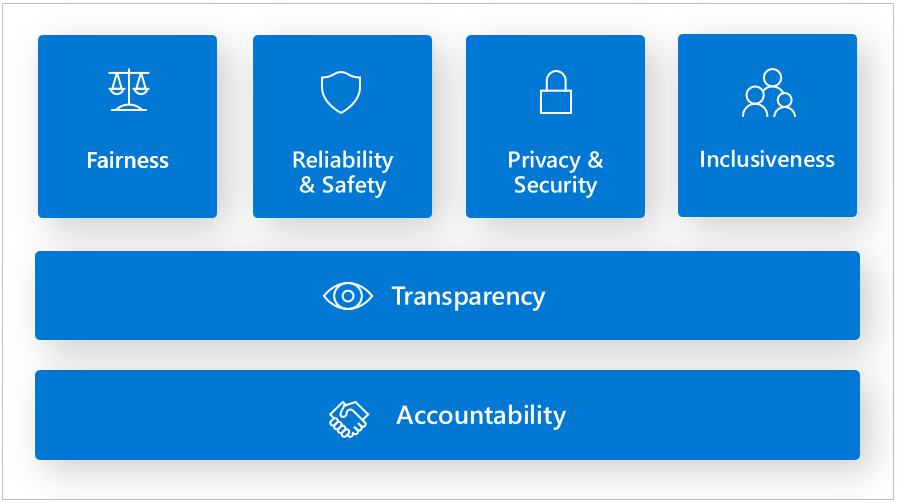
This is why it is imperative that artificial intelligence be inclusive and responsible. These are part of the Microsoft AI principles, and I would recommend all customers evaluate and create similar AI principles. Additionally, if your organization is creating human-AI interaction solutions, I would recommend reviewing “Guidelines for Human-AI Interactions.”
Copilot and Copilot for Microsoft 365
Copilot is a maturing of AI into application specific capabilities/features to increase productivity and assist in creating a workforce/force multiplier. Instead of writing that RFP or term paper from scratch you could use information that existed on the Internet or within the enterprise itself to start as the outline in genesis of your document like Copilot in Word.
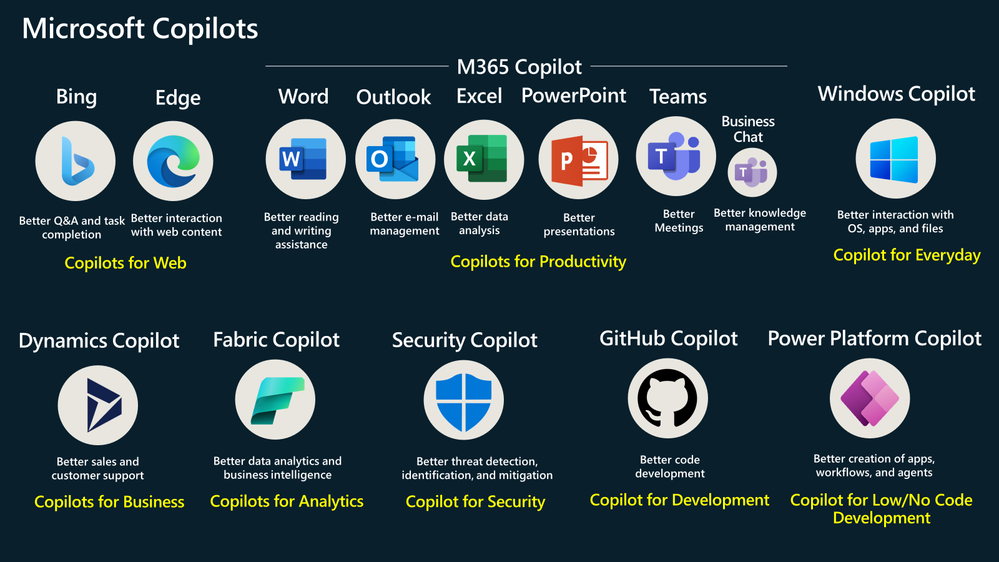
It is important to understand that Copilot is a generic application enabled AI. However, there are many specific Copilot features throughout the Microsoft Ecosystem.
Most popular with users are Copilot for Microsoft 365 features like Copilot in Teams for summarizing meetings or Copilot in Excel for helping all end-users analyze trends in spreadsheets through natural query language (question and answer). You will notice that the suite is named Copilot for Microsoft 365 but each product has an app specific version.
Next, we have Security Copilot that is focused on productivity of security operators and operations. This is not as much an “app” like in Word, but a companion to the Microsoft Sentinel SIEM/SOAR capabilities that many enterprises are using today saving those operators up to 40% in time to resolution for security concerns, investigations or incidence.
In all there are eight Copilot suites from Microsoft today (See chart below). All leverage large language models (LLMs) which give Copilot the ability to take text inputs/questions and generate text responses based on publicly available data and/or restrict responses to an enterprise specific data set and “sandbox” that aligns to the Microsoft 365 service boundary (tenant) to keep data and queries within the organizational control. Generically, the key to understanding how Copilot and Open AI treat the boundary is based on administrative setting to include or exclude access to consumer sites (internet) and based on what credential the user is signed into the service.
Read more: Frequently asked questions about Copilot | Microsoft Learn and Data, Privacy, and Security for Microsoft Copilot for Microsoft 365 | Microsoft Learn
Why is AI so important to accessibility and productivity?
In a sentence: “AI enables accessibility.”
For years, users across the people with disabilities (PwD) community have increasingly been more enabled and productive due to small changes by Microsoft and the larger IT community leveraging AI. These changes have had life altering impacts on users.
One of the most memorable moments in my career was talking with a user with a geospatial disability. She was almost being brought to tears at the realization of PowerPoint Designer (an AI powered feature) would take text and images on the slide and suggest slide layout and design automatically using AI, saving her hours of frustration.
Fast forward to today where a user with a cognitive disability or an employee who is overstressed-overtaxed can get a summary of a meeting, action items anywhere they were mentioned in a Teams meeting and you will quickly understand why all enterprises will need to address and enable Copilot and AI capabilities within their enterprise in the near future to keep up with competitors, emerging global threats and employee retention.
The above Copilot in Teams is just one of the Copilot for Microsoft 365 features you will find to assist your organization in increasing accessibility and enable productivity. There are many other features like: finding relevant information across the enterprise to overcome neurodiversity, ADHD or memory challenges; generating presentations based on other documents to assist users with motor or mobility disabilities and avoiding large amounts of keyboarding; and summarizing email inboxes to assist low vision or blind users who use screen readers to summarize large threads.
The key takeaway is that Copilot for Microsoft 365 opens up a range of new features that allows all users to find new and innovative ways to increase their own productivity while keeping enterprise data secure.
What new challenges are facing organizational security/CISOs
If Azure OpenAI (Chat GPT) is revolutionary and not just evolutionary with all the benefits expressed above and more, why is there hesitation in the adoption of this new impactful technology? The answer is Data Security and Organizational Security.
With the operational tempo (OPTEMPO) of cyber threats increasing year over year and the shortage of trained security personnel, CISO and Organization Security Operations are struggling to on-board new technologies. Many use a Secure Development Lifecycle (SDL) approach that sees AI as introducing more and unique attack vectors/surface.
Microsoft understands these constraints and so had developed Microsoft and Azure Purview to help protect data from insider risks and allow granular controls on access/use within the organizational boundary. Microsoft Purview allows data cataloging, data sensitivity labels and data governance alongside insider risk protections. Additionally, Microsoft allows further protection by use of Azure Key Vault and Customer Manage Keys that allow the organization to “own the keys to the kingdom/data.” Both the above serve as a baseline on protecting data with respect to AI that will rely and use that data.
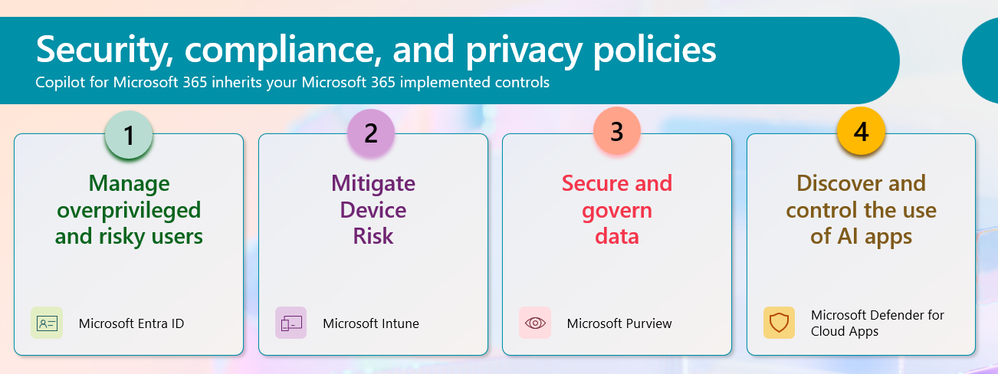
If data clean up is not a key component of your strategy, users will find data with AI that is hidden by traditional methods. An example of this was back in the SharePoint days when customers would turn on SharePoint Search with the security filtered permissions but would quickly turn off. It wasn’t that SharePoint wasn’t filtering out files and data in accordance with the permissions, it was more the fact that there were so many data sources being crawled that hadn’t been properly evaluated. Security through obscurity was no longer obscure and thus required restricted permissions to be applied first.
Secondly, organizational security or keeping even the questions being asked of AI confidential is critical in many government and national security related organizations. Here to, Microsoft has enabled the use of an organization boundary for AI. Copilot and Azure OpenAI have an enterprise version to keep all the questions, answers, and data within that organization’s existing Microsoft 365/Azure cloud boundary.
Lastly, Microsoft has documented several settings within Copilot to allow enterprise security to control the roll-out and use of Copilot that aligns with an iterative approach to rolling out new technologies. This documentation focuses on Data Usage, Training Boundaries, Data Residency and Data Control to name a few of the major topics any deployment team will most likely want to review.
Whether your focus is Azure OpenAI, ChatGPT, Copilot or other AI technologies it is always helpful to:
- Review Impact (adoption and non-adoption)
- Review Risks (business, 508/504 complaints, security)
- Secure your data and have processes for “discovered” new data
- Draft Policies on who and how the tools and data can be used
- Start small – By limiting the scope, type of AI or users
How do we balance and mitigate security while maintaining and enabling accessibility
“Off” is not Secure
The first principle that every organization must understand is that AI is here and users will find a way. Recently, there was a survey of organizations and it found that 90% of users typed confidential organizational information into external Open AI, ChatGPT like agents available from multiple vendors. This means that AI is here. Not addressing it is not secure nor enabling your users to be their best.
Additionally, many users will use 3rd party applications on their phones to supplement capabilities turned off by their enterprises. So, turning off Live Captions and/or Transcription in Teams which uses AI Speech to Text forced users to use non-governmental, commercial apps on their phones to be productive.
“Phase-in” AI to win everyone
Embracing the move and change to AI in a phased method is a better approach and has been shown to win-over all users. Enlist the Accessibility community and PwD to vet features, usability, settings, and data sources by making them “pilot members” of the roll-out. They feel empowered and critical to the success of the AI effort. Additionally, you should see increased productivity and employee retention through the “People with Disabilities first” approach.
Often the 508 or Accessibility office involvement is delayed to the last steps in delivery of a new technology instead of the genesis of it. Given the patience the accessibility community has had over the years for IT to catch up and make work more equitable, it is time to bring them in and make them part of your first ring of deployment and not the last.
Phasing your rollout across organizations and levels also allows your organization to catch missed data sources and get help from the users to help identify and secure the data first before the next phase is started.
Phase in the types of AI. Starting with the types of AI that is more aligned to fully managed Software as a Service (see below) like Intelligence Services in Office or Copilot allows your organization to get comfortable with and work through AI policies while reducing the strain on IT, Security and Data infrastructure that building your own AI will introduce.
Lastly, we recommend including governance folk to help start out on the right foot by defining an AI governance framework to ensure ethical and responsible AI practices from the beginning.
A great place to get started is Empowering responsible AI practices | Microsoft AI.
All AI is not the same
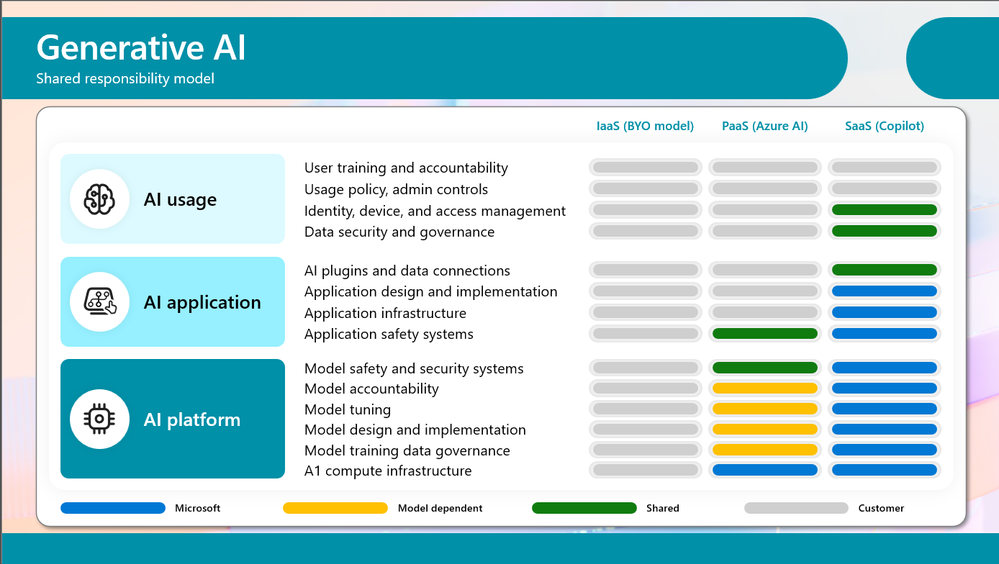
In all the jumbled cauldron of AI terms, we see only the magic that AI is and can be. However, it is important to understand AI differs widely based on type. For many of you that are familiar with the Infrastructure as a Service (IaaS), Platform as a Service (PaaS) and Software as a Service (SaaS) description of Azure, this will look eerily familiar.
However, it also helps your security spend more time where it is needed. Notice in the chart below that as you go from left to right (IaaS to PaaS to SaaS) that Microsoft takes on more responsibilities. Notice that Copilot is a SaaS model and therefore is probably one of the safest places to start with AI within your enterprise.
Acknowledge through Policy
If there are truly features and capabilities of Azure OpenAI, AI or Copilot that the organization has discovered is too much of a risk, we would recommend documenting the reasoning behind the disablement, allowing alternatives and managing the risks of using 3rd party applications as a “workaround”.
Without these guidelines or implementation of a solution like Microsoft Defender for Cloud Apps, users will “find a way” and may use any external cloud solution they find.
How is Microsoft balancing security and AI to enable accessibility and productivity and how you can too
Similar to the approach that Microsoft took to address Accessibility within Microsoft, Microsoft’s journey in AI encompassed culture, technology, training/readiness and policy updates.
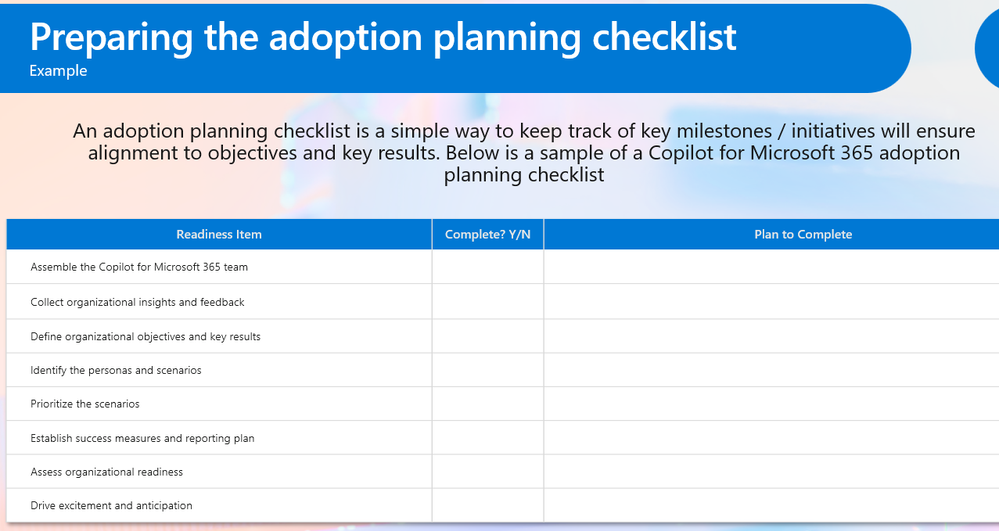
We know like the transformation to an inclusive workplace; AI will require a similar culture shift. To that end, Microsoft has taken lessons learned from its implementation of AI and created checklists, planning and guidance to help every organization achieve more…and faster.
One thing that is critical that hasn’t been mentioned above is education and training. These are critical to the success of your AI implementation. Training and education for employees on cybersecurity best practices and how AI potentially impacts current policies is needed for any complete approach.
A great role-based training path for AI is Get skilled up and ready on Microsoft AI | Microsoft Learn.
Summary
AI is here. Whether your enterprise deploys it or not, users will be using it and may be unknowingly sharing sensitive information with unknown, external AI solutions. So, I encourage all organizations to reach out to the accessibility community (accessibility Employee Resource Groups-ERGs) within their organizations and understand how and what AI capabilities are needed to help guide your implementation of Copilot or AI in a secure, inclusive manner. Bring those needs and attend the AI Security Summit 2024 in May, if you would like to jump start your organization’s journey to AI. Build your organizational AI virtual team and get started today!
Resources:
“AI Security Summit 2024” – https://aka.ms/GovAISecSummit24
Data, Privacy, and Security for Microsoft Copilot for Microsoft 365 | Microsoft Learn
Copilot for Microsoft 365 – Microsoft Adoption
Microsoft Purview data security and compliance protections for Microsoft Copilot | Microsoft Learn
Embrace responsible AI principles and practices – Training | Microsoft Learn
Responsible AI Principles and Approach | Microsoft AI
Microsoft Responsible AI Standard v2 General Requirements
Guidelines for Human-AI Interaction – Microsoft HAX Toolkit












