QuickBooks Timesheets is a crucial component in the QuickBooks family of employee time and payroll management apps. It’s designed to simplify the process of recording, monitoring, and analyzing the time your employees spend on various tasks and projects.
Whether you’re an accountant, a project manager, or any construction industry professional in charge of a labor force’s hours and payrolls, understanding how to utilize this tool effectively can have a tangible impact on your project’s success and profitability.
This article will take a deep dive into every vital aspect of QuickBooks Timesheets, with actionable guidance to help you master its extensive feature sets and valuable tips and tricks for optimal use.
Overview of QuickBooks Timesheets
History and Development
Intuit’s QuickBooks brand is a household name in business accounting software today, and that name has been built over time through a combination of early innovations and targeted acquisitions. Quickbooks Timesheets resulted from one of these acquisitions – the product was initially known as TSheets before Intuit bought it in 2017 for about $340 million.
TSheets was created in 2006, and it was one of the first companies to release a native mobile app for employee time tracking in 2008 – at the time, the iPhone was barely a year old, and most people still thought of “smartphones” as BlackBerries or Palm Pilots. We’ve come a long way in 15 years!
Intuit folded TSheets into its Small Business and Self-Employed division after the acquisition, and its employee time-tracking features have since become part of the QuickBooks Time suite, which also includes scheduling, job costing, and project management features.
Functionality and Layout
QuickBooks Timesheets is a digital timecard for a construction company’s front-line workforce. Workers in the field use the QuickBooks Workforce app to track their time spent on worksites and their mileage – that is, the time they spend traveling for the sake of the job.
Workers can use the QuickBooks Workforce app to clock in and out, switch between jobs if they need to be tracked across multiple jobs or jobsites, and view their payroll information. Managers can also use QuickBooks Workforce to track project progress, adjust employee schedules, and approve submitted timesheets.
Here are some screenshots from the current (as of this article’s publication) iPhone version of QuickBooks Workforce:
Most of QuickBooks Timesheet’s power is found behind the scenes in the QuickBooks Time dashboard, which managers, HR professionals, or anyone responsible for managing team payrolls can use to oversee employee scheduling and tracking.
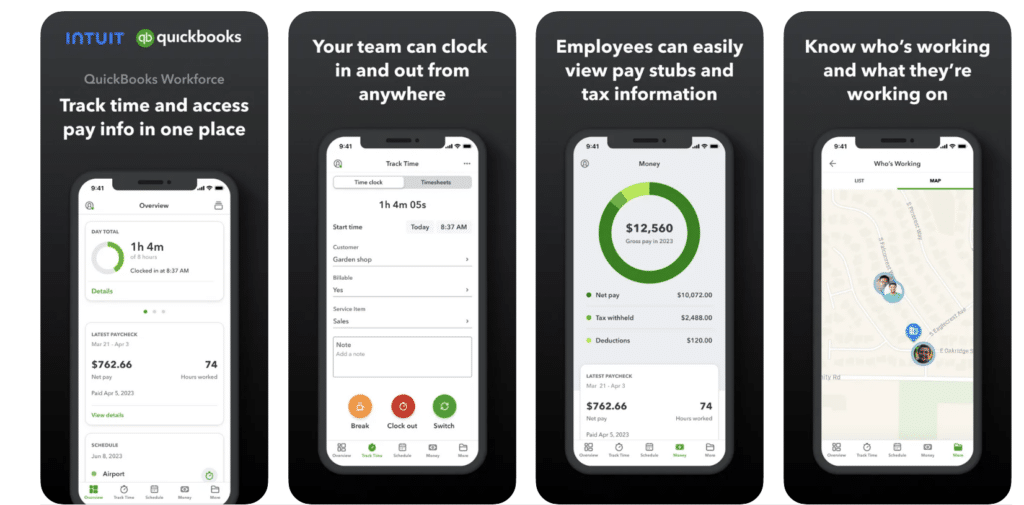
In addition to being able to oversee employee use of the mobile timesheet app in QuickBooks Workforce, admins and managers also have access to the following key features of QuickBooks Timesheets, which we’ll explore in greater detail in the next sections of this guide.
-
GPS and Geofencing: Allows construction companies to track employees based on GPS data and geofencing inputs. -
Scheduling: Allows for the creation or modification of employee schedules by the shift, by the job, or by the task. -
Time Kiosk: Functions as a centralized time clock for employees to clock in or out while onsite through any computer or tablet with an internet connection. -
Alerts & Approvals: Allows notifications to be set and customized based on employee behavior – both expected and unexpected. -
Reporting: Provides a range of customizable outputs to help construction company managers and leaders assess workforce performance.
QuickBooks Timesheets dashboard also integrates with other QuickBooks products, as you might expect. The time data you and your team enter can be directly linked to specific customers, jobs, or services, enabling more accurate billing and payroll computations. The QuickBooks Timesheets landing page even claims to save businesses an average of 4% on payroll costs when properly deploying Timesheets and the Workforce app to employees.
Here’s a good overview of QuickBooks Timesheets and its functionality from bookkeeping company Gentle Frog:
Key Features of QuickBooks Timesheets
Let’s take a closer look at the key features of QuickBooks Timesheets we examined in the previous section:
GPS and Geofencing
-
GPS Tracking: Real-time smartphone GPS data has become an increasingly accurate way for companies to see the location information of their employees. The QuickBooks Workforce app claims to track employee GPS locations only when that employee is “on the clock.” -
Geofencing: This feature allows companies to set virtual boundaries around specific job sites. When an employee enters or exits these boundaries, managers can receive notifications. It’s a game-changer for ensuring timely arrivals and departures and preventing unauthorized site visits.
Scheduling
-
Shift Scheduling: Create or modify schedules for your workforce based on shifts, ensuring there’s always adequate staffing for every project phase. -
Job-Based Scheduling: Allocate and adjust your workforce based on specific jobs. This provides optimal allocation of resources throughout the project. -
Task-Based Scheduling: Dive even deeper by scheduling employees based on specific tasks within a job. This granularity ensures that each task is addressed promptly and by the right person, and can be helpful in managing projects with many sub-tasks and secondary or stretch objectives.
Time Kiosk
The Time Kiosk feature is essentially a computerized punch clock system. Employees can clock in or out using any computer or tablet with an internet connection.
It can be beneficial for larger job sites with multiple entry/exit points, particularly if you’ve got a workforce that resists using the mobile app’s GPS tracking features, or if many of your workers simply don’t have compatible smartphones.
Alerts & Approvals
-
Customize notifications based on expected employee behavior, like regular clock-ins or clock-outs. -
Set alerts for unexpected behavior, such as early departures or late arrivals. -
Implement an approval process, ensuring submitted timesheets are reviewed and approved by managers before they’re processed for payroll.
Reporting
-
Customizable reports with insights into workforce performance, including hours, rate, overtime, and more. -
Data-driven assessments based on individual employees, teams, entire projects, specific customers, or custom groups. -
Export to CSV, Excel, or PDF.
Benefits of Using QuickBooks Timesheets
QuickBooks Timesheets can be a helpful addition to a construction company’s technology stack. Here’s a closer look at its main benefits:
-
Improved Job Costing Accuracy: By keeping track of each employee’s time against specific tasks, jobs, or projects, it becomes simpler to allocate labor costs accurately, ensuring a clear picture of the project’s finances. -
Streamlined Payroll Processing for Hourly Workers: With accurate time tracking in place, the chances of discrepancies in payroll are drastically reduced. Employees get compensated for their exact hours, resulting in greater job satisfaction and less payroll waste or misallocations. -
Enhanced Profitability Analysis on Projects: Having a clear breakdown of time and resources allocated to each project allows managers to evaluate project profitability, identify areas of improvement, and reallocate resources as needed. -
Improved Resource Allocation and Scheduling: With the scheduling feature, managers can ensure that resources are utilized effectively, leading to timely project completion and reduced idle time. -
Reduction in Manual Paperwork and Data Entry Errors: Digital time tracking eliminates the need for manual time cards, reducing the potential for human errors and making data processing more efficient.
Potential Issues With QuickBooks Timesheets for Construction Businesses
While QuickBooks Timesheets offers many features and benefits, it’s essential to consider the specific challenges construction businesses may face and whether or not Timesheets adequately addresses these challenges:
-
Poor GPS Tracking: Some users have reported occasional inconsistencies in the GPS tracking feature, which might lead to inaccurate location data. -
Poor Support: While Intuit generally offers customer support, some users feel that the response time or quality of support, specifically for Timesheets-related queries, needs to address construction-industry concerns adequately. -
No Job Costing: Contrary to some other tools’ in-built job costing feature, QuickBooks Timesheets does not provide a direct job costing solution, which might require some workaround or integration with other modules. -
Not Designed for Construction Scheduling: Though it offers scheduling features, it’s not tailor-made for the complex scheduling needs of large-scale construction projects. There’s no ability to add attachments to schedules from either the employee or management sides of the app and managers can only provide limited instructions to employees in their schedules. -
Inefficient Clock-In Clock-Out: Inefficient Clock-In Clock-Out: While the Time Kiosk feature can be beneficial in some cases, the QuickBooks Workforce app is not always the best at clocking employees in and out accurately or intuitively.
To give you a real-world perspective, here’s a review from a construction business owner:
Jpommerville says of the iPhone app:
“As soon as Quickbooks purchased [TSheets] and turned it into Quickbooks Time, the quality dropped and support became some of the worst I’ve ever seen. The integration with QuickBooks Desktop has failed many many times, and each time takes days and dozens of phone calls before the issue is resolved… We are now switching away from QuickBooks Time after 4 years of using it because other companies have figured out how to integrate with QuickBooks better than QuickBooks has. Ridiculous.”
Alternatives to QuickBooks Timesheets
Given these issues, some construction companies may opt for other software solutions that are more industry-specific, or that offer features better suited to their needs. For example, Workyard (that’s us!) addresses all the issues highlighted above, with other helpful industry-specific functionality for construction companies of all sizes. Take a look at how we do it:
Tips and Tricks for Using QuickBooks Timesheets
Mastering QuickBooks Timesheets can drastically improve your efficiency, time management, and productivity. Here are some tips and tricks to help you get the most out of this tool:
Keyboard Shortcuts
Familiarize yourself with QuickBooks Timesheets’ keyboard shortcuts. Here are a few shortcuts for everyday actions:
-
Clock In
Windows: Alt+Shift+I
Mac: Opt+Shift+I -
Clock Out
Windows: Alt+Shift+O
Mac: Opt+Shift+O -
Take or End a Break
Windows: Alt+Shift+B
Mac: Opt+Shift+B -
Close a Window
Windows: Alt+Shift+W
Mac: Opt+Shift+W
Recurring Timesheet Templates
If you have employees working on repetitive tasks or reoccurring project types, set up recurring timesheet templates. This minimizes manual entries and ensures consistency.
Mobile Integration
Encourage your team to use QuickBooks Workforce. Without this app, you’ll need to use the Time Kiosk feature, which is less accurate.
Automatic Reminders
Set up automatic reminders for employees to submit their timesheets. This can help reduce the last-minute rush and potential oversights.
Timesheet Approvals
Implement a review process where timesheets need managerial approval before processing. This additional layer of scrutiny ensures accuracy and accountability.
Common QuickBooks Timesheets Mistakes and How to Avoid Them
Even with the best tools, mistakes can happen. Here’s a rundown of some common pitfalls users might face when working with QuickBooks Timesheets, and tips to help you steer clear of them:
Not Reconciling Timesheets with Actual Work Done
Merely relying on timesheet entries without cross-checking them against the actual work done can lead to discrepancies.
Solution: Regularly reconcile timesheet data with project progress. This can be done through weekly meetings or by using project management tools in tandem with QuickBooks.
Overlooking Job-Specific Time Tracking
Generalized time entries can skew job costing and profitability analyses.
Solution: Encourage employees to be as specific as possible when logging hours, specifying the job, task, and any other relevant details.
Delaying Timesheet Entries
Waiting too long to enter timesheet data can lead to forgotten details or inaccuracies.
Solution: Make it a daily habit or use mobile integrations to log hours as and when they are completed.
Not Training Employees
Assuming all employees will intuitively understand how to use QuickBooks Timesheets and the QuickBooks Workforce app can lead to inconsistent data entries.
Solution: Invest time in training sessions, ensuring every team member knows how to use these tools correctly. Also, keep your team updated with any new features or changes released for the apps.
Not Using the Approval System
Bypassing the approval system can mean inaccuracies go unchecked.
Solution: Make it mandatory for all timesheets to go through an approval process. This not only ensures accuracy but improves accountability as well.
Wrapping Everything Up
Key Takeaways
-
QuickBooks Timesheets can be a helpful addition to construction companies’ toolkits, mainly if they employ a large hourly workforce. -
However, QuickBooks Timesheets isn’t necessarily optimized for construction companies’ needs, so you’ll need to evaluate its benefits and drawbacks when deciding whether or not you should implement it. -
Workyard’s time-tracking system is built from the ground up to support construction companies. Looking for a great time tracker with GPS and geofencing capabilities (and much more) for your field workforce? Check out what Workyard can do!
Accurately tracking employee time and tasks is crucial to a construction company’s ability to complete any project profitably. Jobs always need to get done, but everyone should be on the same page to make that happen correctly. QuickBooks Timesheets is a tool that can help with handy features for you and your workforce – but like any tool, you’ve got to know how to use it right.
Perhaps just as important is knowing whether or not QuickBooks Timesheets is the best solution for tracking your employees’ time and managing their hours. QuickBooks products tend to be built for the broadest possible audience, which can mean they may lack specific features your business needs.
In the end, it’s all about getting the job done right and on time while ensuring “on time” is tracked properly for every employee every time. Tools like QuickBooks Timesheets can help – but they’re not the only tools available to construction companies.
Workyard was built from the ground up to support construction companies. With Workyard, it’s easy to manage the schedules of dozens or even hundreds (or more) of employees while accurately tracking their time on the job with our mobile app’s industry-leading GPS and geofencing capabilities.
Experience the difference Workyard can bring to your employee time-tracking efforts. Sign up for a free trial today or contact (650) 332-8623 for more details.
The post QuickBooks Timesheets Guide: How to Use, Key Features, Tips and Tricks, and More appeared first on Workyard.